
Your players can check whose turn comes next on their own phones. You choose which creatures and details they see, while you keep running the fight.
The player view arrives in OpenFray 1.0, taking the combat console out of beta. OpenFray is free, runs in a browser tab, and needs no account to run a fight.
Open the console and share the turn order with your table.
Give the table its own screen
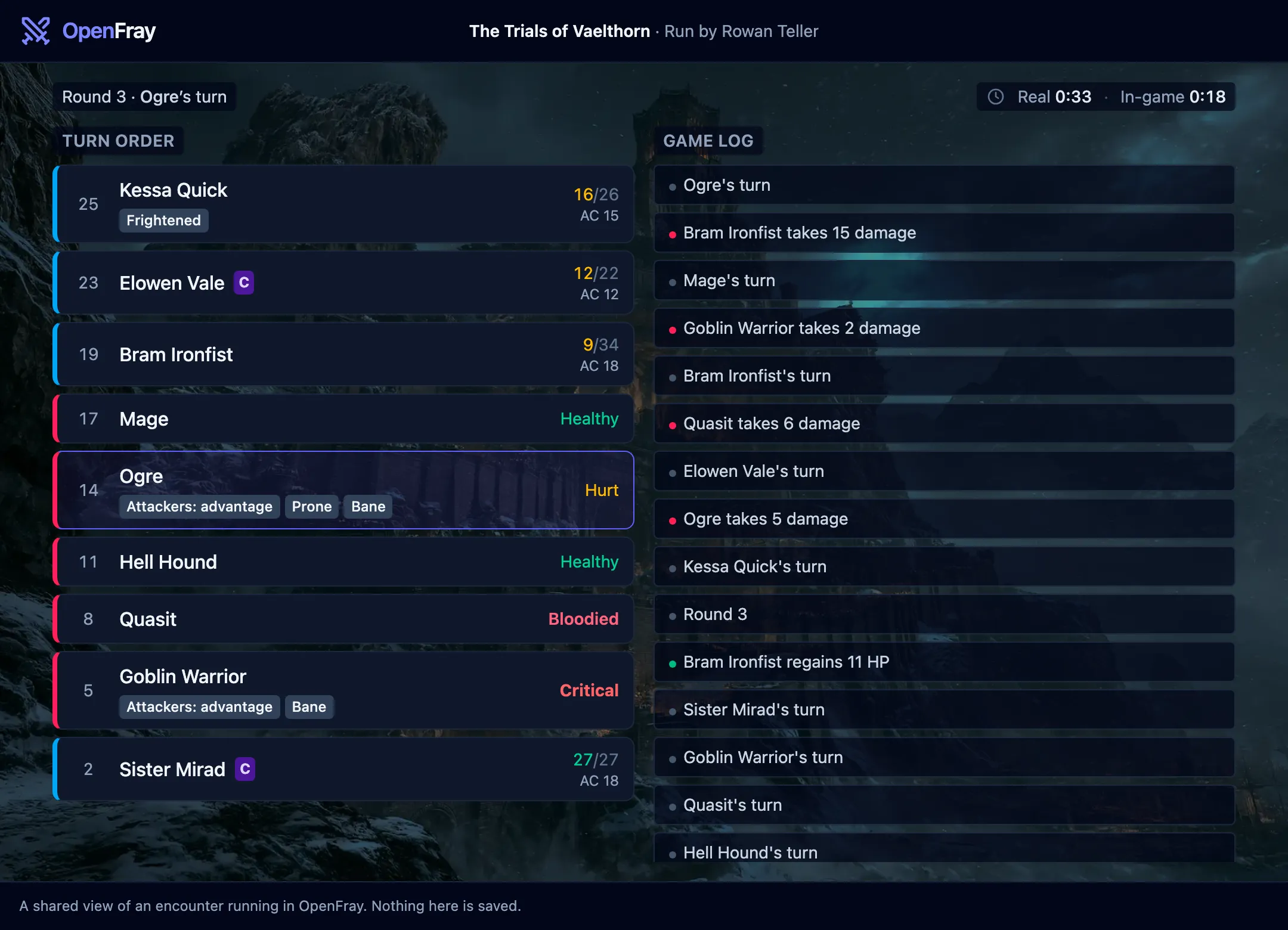
Share a link to the player view. It shows the turn order and game log, updating as you run the fight. You choose what reaches it:
- Hide a creature, or reveal it early. A creature the party hasn’t seen stays off the view until you show it.
- Keep a creature’s conditions to yourself. The table sees that something is happening without seeing which effect you applied.
- Let a creature fight for the party. A summoned bear or a charmed guard sits with the players rather than against them.
The shared log shows action names and roll totals, with the dice breakdown left out. Saving throws reach it after you settle them. The fight’s clocks, damage dealt by each side, and end-of-fight summary go across too.
The log starts fresh with each fight, sharing survives a reload, and it ends when you close the tab. A link can be named, so you can tell one table’s view from another’s.
The player-view guide covers the sharing controls.
Apply the whole effect together
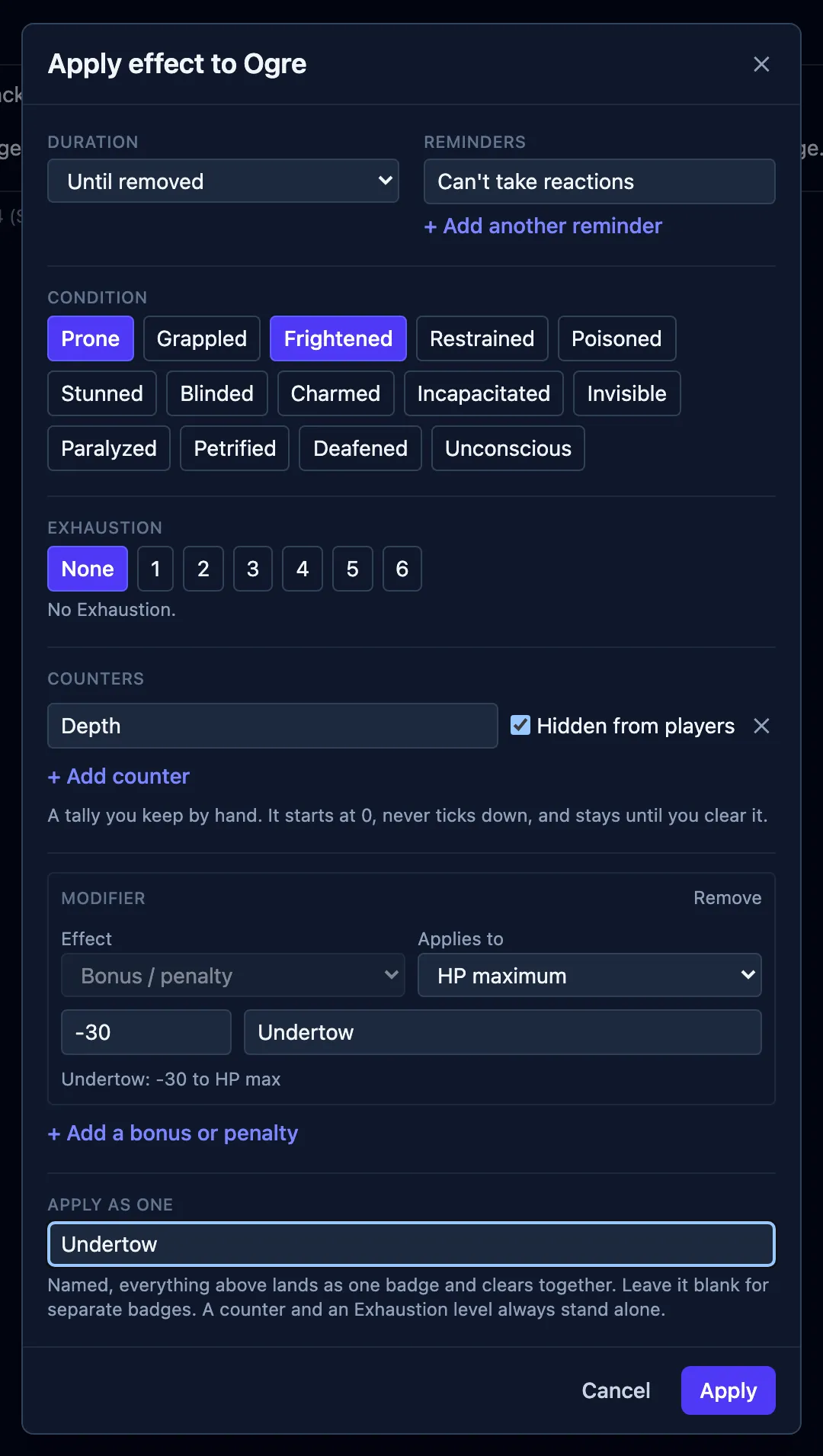
An effect with a condition, a modifier, and a reminder can now be applied as one named bundle. Stage it in Apply effect; the parts log as one entry and clear together.
- Bonuses apply to the rolls you choose. Scope a modifier to Dexterity saving throws, for example. Bless and Bane apply to attacks and saves.
- An effect can be yours alone. Mark it for the Game Master, and the count you are keeping stays off the table’s screen.
- Effects reach a character’s numbers. Armor class, initiative, hit point maximum and Speed are derived for a saved character, and an effect can move any of them. A Speed modifier can halve it, double it, or drop it to 0.
- A spell’s effects arrive together, in a bundle named for the spell. Spell effects were checked against the rules text of both editions.
- Exhaustion has a level and can be applied through an attack or a saving throw.
- Save an effect you use often as a preset. The diseases from Brood & Bloom ship as presets already.
Dice you can check
An advantage roll shows both dice and says which one counted. A damage roll shows the dice behind the total. An arrow separates the dice from their total, and a natural 1 is labeled a critical miss. There is a reroll wherever OpenFray rolls. A group saving throw applies each creature’s own resistances and immunities by damage type, and says what it rolled for whom.
The rolls come from opendice, which uses a cryptographic random generator and returns every die for the log to display.
More material for your next session
On Strong Waters and Potent Simples is the third book OpenFray writes, and the first with no creatures in it. Hesper Aldwine’s eight chapters cover drink, smoke and the simples: what they do, what they cost, where they are found, and what happens to someone who keeps taking them. It ships with three appendices, a print edition, and 11 spells you can cast from the console. Intoxication, Craving, and Addiction are available as effect presets.
Creature Codex joins the opt-in libraries, alongside the three Tome of Beasts books. Tick it in Settings and its creatures appear in the compendium with their own source line.
Brood & Bloom also gained its spells as a castable library, and the Hands of the Host.
Try it with your table
Getting started walks through a first fight, and the player-view guide explains how to share it. The changelog records what changed in each release.
You can run a fight without an account. A free account keeps your custom creatures, characters, and campaigns available across devices for the next session.
Open the console, add your party, and share the player-view link. Sign in with Google or Discord to save your characters and campaigns.