
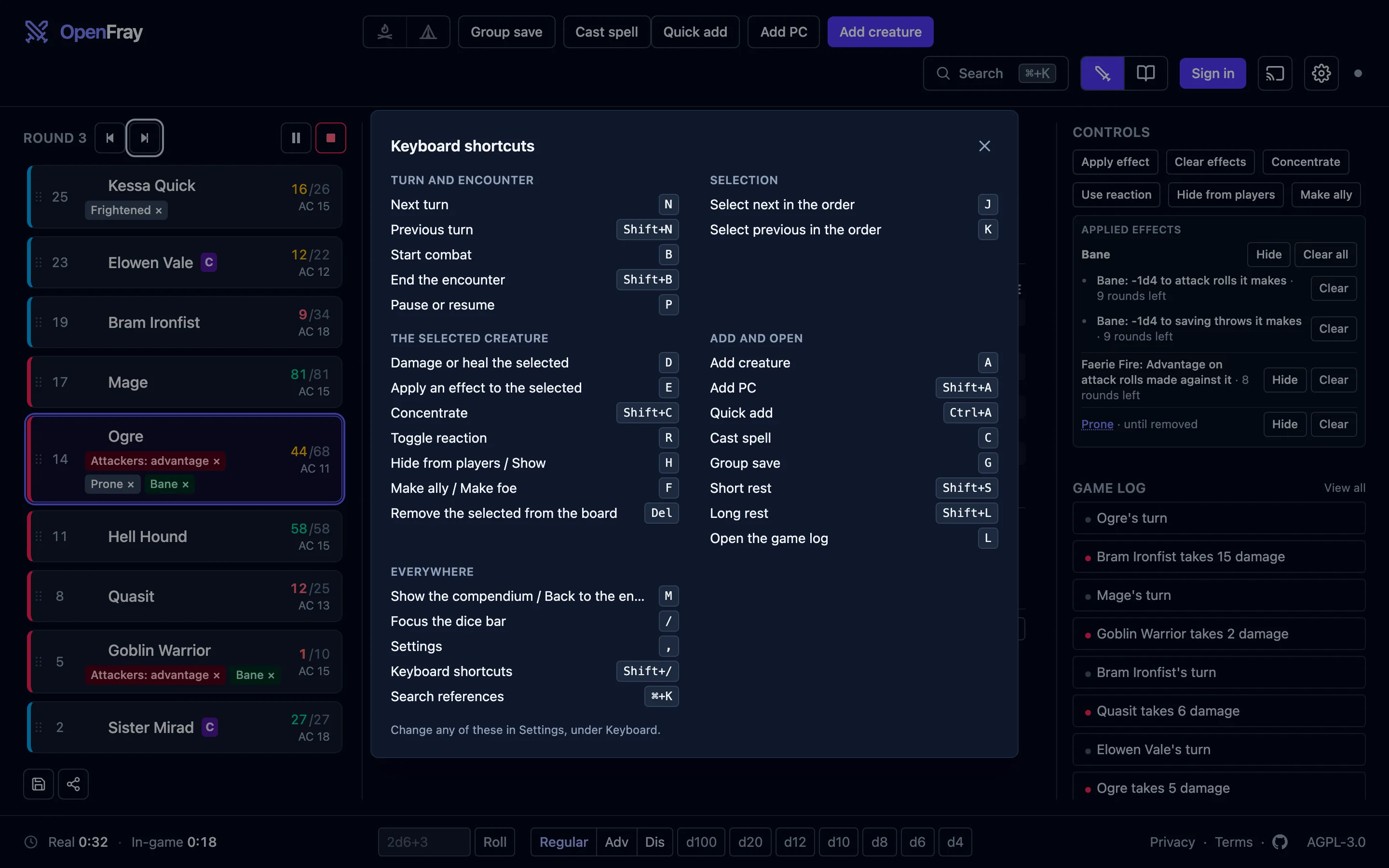
OpenFray 1.1 gives phones and tablets their own layouts. At a laptop, keyboard shortcuts let you advance turns, apply effects, and cast spells without reaching for the mouse. You can change the keys to suit you.
OpenFray is a free combat console for Game Masters running DnD 5e, compatible with 5.5e and 5e. It runs in your browser, with no account needed for a fight.
Open the console on the device you bring to the table.
The console in your pocket
Swipe between the tracker, stat block, and controls on a phone. Tap a creature to open its stat block, or use the bottom bar to jump to another screen. Panels open as sheets, and controls have larger touch targets.
A portrait tablet uses the same layout. Turn a small tablet sideways and the tracker sits beside the stat block, with controls and the log below. A laptop keeps the three-column view.
Run it from the keyboard
Advance the turn with N, select creatures with J and K, or press D to reach
the selected creature’s hit points. E opens effects, G opens a group save, and
C opens spellcasting.
Press Shift+/ for the full list. Change any shortcut in Settings → Keyboard
to fit the keys you use at the table.
Let the turn clear the effect
Set an effect to end at the start or end of any creature’s turn. For “Charmed until the start of its next turn,” choose that turn in Apply effect and the console clears it when the turn arrives.
Add or its next roll to end an effect early on the first roll it changes. It replaces the old “This turn / next attack” option; effects saved with that option still work.
Group saves, concentration checks, and stat-block rolls now clear the effects they spend. Vicious Mockery, Latchwork, Guiding Bolt, Guidance, and Resistance also have corrected duration bounds, checked against both editions.
The effects guide covers durations and the controls for applying them.
Keep the spell’s effect after the hit
Guiding Bolt now applies its effect to the target it hits. Flame Blade, Spiritual Weapon, Arcane Hand, Arcane Sword, and Vampiric Touch leave their reminders on the caster after resolving the attack.
A saved character’s spell attack bonus and spell save DC are filled in from the class, level, and ability scores you transcribed. A multiclass caster, a subclass caster, and an anonymous character leave the field to you, as before. Casting has its own handbook page.
Write notes on the campaign card
Campaigns now carry private notes for your threads and hooks. Write Markdown in the campaign form or directly on its card. The campaign guide explains where to find them.
In the books
Brood & Bloom’s Reliquary Imago and Tallow Imago now say where their size comes from. Both open from a husk built around a much smaller larva: the case holds the body, and the wings come out folded and open as the moth rises. The sizes themselves are unchanged.
Smaller things
- A condition chip is lit when the target has that condition. Tapping a lit chip clears the condition.
- A picker says what it just added.
- The compendium follows the same layout switch as the fight.
Bring the device you have
Getting started walks through one fight, from an empty board to the summary at the end. The changelog records this release’s changes.
A free account keeps your characters, custom creatures, and campaigns available across devices. Your keyboard preferences stay in the browser where you set them.
Open the console on your phone, tablet, or laptop. Try a fight, then sign in with Google or Discord to keep your party and campaign for next time.