Track concentration
Some spells last only while their caster keeps concentration, and hold it until the caster drops it, loses it to damage, or lets it run out. OpenFray tracks who is concentrating on what, and clears the spell’s effects everywhere the moment concentration ends. This page covers starting it, ending it, and the check after damage.
Mark a creature as concentrating
Section titled “Mark a creature as concentrating”- Select the creature and click Concentrate in the controls beside its stat block.
- Type the spell’s name, and pick how long it lasts if you want the timer. Both are optional.
- Click Set. The creature’s row shows a C badge while it concentrates.
Casting a concentration spell from Cast spell, or from a creature’s stat block, starts this for you with the timer already counting, as soon as the spell lands on someone. A spell every target shrugs off leaves nothing to hold on to, so nobody is marked as concentrating.
The video below shows the control in use, from naming the spell to ending the concentration, with the log recording both:
End concentration
Section titled “End concentration”Concentration is what keeps the spell going, so ending it removes that spell’s effects from everyone at once. Break the caster’s concentration on Bless and all three blessed allies lose it together; you don’t clear each one by hand.
To end it yourself, select the creature and click End concentration, where Concentrate was. Concentration also drops on its own when its timer runs out.
The check after damage
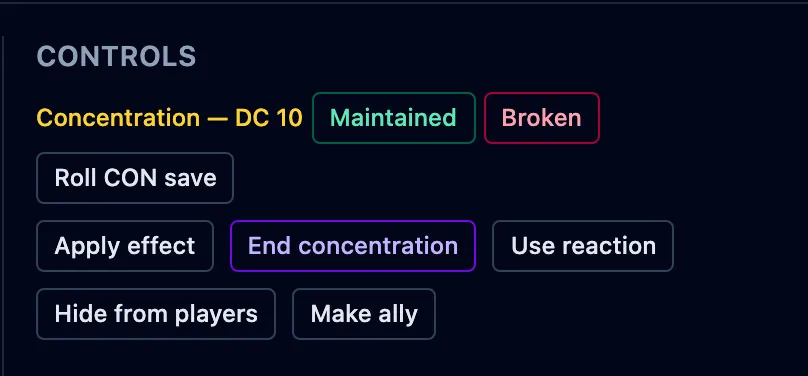
Section titled “The check after damage”When a concentrating creature takes damage, it must make a Constitution save to hold on. OpenFray works out the DC (10, or half the damage taken, whichever is higher) and prompts you in the controls beside the stat block:
- Maintained — the save succeeded; concentration holds.
- Broken — the save failed; concentration ends, and the spell’s effects clear.
- Roll CON save — for a creature, OpenFray rolls the save for you. A player rolls their own, and you tap Maintained or Broken.
Breaking concentration this way clears the spell’s effects the same as ending it by hand.