
How effects work
A fight covers a creature in small facts: this one is frightened, that one has advantage, someone is blessed. In OpenFray every one of these is an effect, and they all work the same way. You tell OpenFray what happened; it remembers it, shows it on the board, and works it into the right rolls and numbers. This page explains the model. The steps for putting an effect on a creature are in Apply & manage effects.
The kinds of effect
Section titled “The kinds of effect”Whatever spell or ability caused it, what lands on a creature is always one of these:
| Kind | Examples |
|---|---|
| A condition | Prone, Frightened, Paralyzed, Poisoned |
| Attacks against it have advantage | Faerie Fire, attacking a prone creature in melee |
| Its own rolls have disadvantage | Vicious Mockery, Bane |
| A bonus or penalty to rolls | Bless (+1d4), Bane (−1d4), +10 to Stealth |
| A change to its numbers | +2 to armor class, Speed halved, −10 HP maximum |
| A reminder | a note to yourself, like “Hex: +1d6 on a hit” |
| Ends on a save | something a saving throw shakes off |
| A counter | a tally you raise and lower, like a corruption track |
| A level of Exhaustion | 1 to 6, with the penalties each level brings |
Conditions are one kind of effect among the rest, so there’s only one thing to learn.
Effects change rolls and numbers
Section titled “Effects change rolls and numbers”An effect is worked into everything it touches, on its own:
- Advantage and disadvantage from effects are rolled into attacks and saves, whichever side is rolling. One of each cancels out.
- A bonus like Bless’s +1d4 is added to the roll and shown beside it.
- A modifier aimed at armor class, Speed, or the hit point maximum changes the number itself. The stat block and the tracker row show the changed value for as long as the effect lasts, and rolls and damage use it.
When an effect lowers the hit point maximum below the creature’s current hit points, the current hit points drop to match. They don’t spring back when the effect ends.
A reminder is the exception. OpenFray shows it and keeps it in front of you; it doesn’t apply anything for you. A reminder is a note, and you decide what it means.
How long effects last
Section titled “How long effects last”Every effect knows when it ends. Some count down in rounds, and the board shows what’s left (“10 rounds left”). Some clear on their own at the right moment:
- effects hung on a turn clear at the start or the end of that turn. The turn can belong to anyone on the board, so a fear can end when the creature that caused it acts again;
- effects marked or its next roll also clear on the first roll they change (Vicious Mockery), whatever their duration says. OpenFray never sees a player’s own rolls, so for a player the duration is what ends it;
- effects that last a set time clear when it runs out, and show the time when OpenFray can’t count it in rounds (“1 hour left”);
- the rest stay until you clear them.
Effects a saving throw ends
Section titled “Effects a saving throw ends”Some effects hang on until the creature makes a saving throw: a paralysis, an ongoing burn. Each one carries its own save, with the ability, the DC, and whether it’s rolled at the start or the end of the creature’s turn. Two effects that happen to need the same save still roll separately. On a creature’s turn, OpenFray makes these saves for it at the right moment; a player rolls their own, and you record it.
Bundles
Section titled “Bundles”One spell often lands several parts at once: Haste is +2 armor class, advantage on Dexterity saves, doubled Speed, and a reminder about the extra action. Parts applied together under a name become a bundle: one badge on the row, one Clear all, and one fate. Clear the bundle and everything it applied goes with it; when a save ends a bundled effect, the whole bundle ends, because the save ends the spell.
Counters and Exhaustion always stand alone. A tally outlives whatever applied it, and a level of Exhaustion belongs to the creature, so neither joins a bundle.
Where effects show
Section titled “Where effects show”Each effect shows as a small badge under the combatant’s name in the tracker: just the name, so the row stays easy to read. A bundle shows one badge with its name; point at it to read what’s inside.
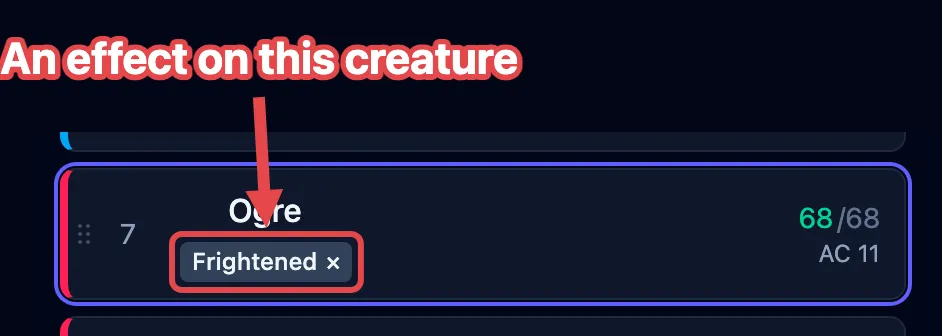
The details live in the Applied effects list, in the controls beside the stat block. That’s where each effect’s buttons are: clearing it, rolling its save, or hiding it from the shared player view. The buttons are covered in Apply & manage effects.
Counters
Section titled “Counters”Some things at the table are a number that goes up and down: a homebrew corruption track, a countdown you’re running. A counter is an effect that holds that number for you, shown on the row as a badge with the number in it.
OpenFray never changes a counter. It doesn’t tick down at the end of a turn, it survives a long rest, and reaching any particular number does nothing on its own. You raise it, lower it, and decide what it means when it gets high. Every change is written into the game log, so you can retrace how a number got where it is.
Exhaustion
Section titled “Exhaustion”Exhaustion is the one condition that isn’t on or off. It’s a level from 1 to 6, and each level costs the creature more. OpenFray holds the level and works its penalties into rolls and numbers, the same way it works in any other effect.
What a level does depends on which rules your campaign plays, so OpenFray reads that from the campaign you’re running (see Set up a campaign & house rules). Without a campaign it uses the 2024 rules:
- Basic Rules 2024 — every d20 roll the creature makes drops by 2 for each level, and its Speed drops by 5 feet for each level. At level 3 that’s −6 and −15 feet.
- Basic Rules 2014 — each level adds a new penalty on top of the ones below it: Disadvantage on ability checks at 1, Speed halved at 2, Disadvantage on attack rolls and saving throws at 3, the hit point maximum halved at 4, and Speed 0 at 5.
Switching a campaign doesn’t rewrite a level already on the board. Set the level again and OpenFray rebuilds it for the rules you’re playing now.
Concentration
Section titled “Concentration”A spell the caster concentrates on is a special case: its effects live and die with the caster’s concentration, everywhere at once. Concentration has its own guide, Track concentration.
Presets
Section titled “Presets”A bundle you apply more than once (a disease stage, a house rule, Drunk) can be saved as a preset and applied again in any fight. Some libraries ship presets of their own. See Presets.