
The stat block
The stat block is the full picture of a creature: the middle column when you select one, and the reading pane in the compendium. It’s the same layout printed books use. This page names each part and points out what you can click during a fight.
Select a creature to see its stat block. The one for a player character is shorter, and is covered under Creatures, players & quick adds.
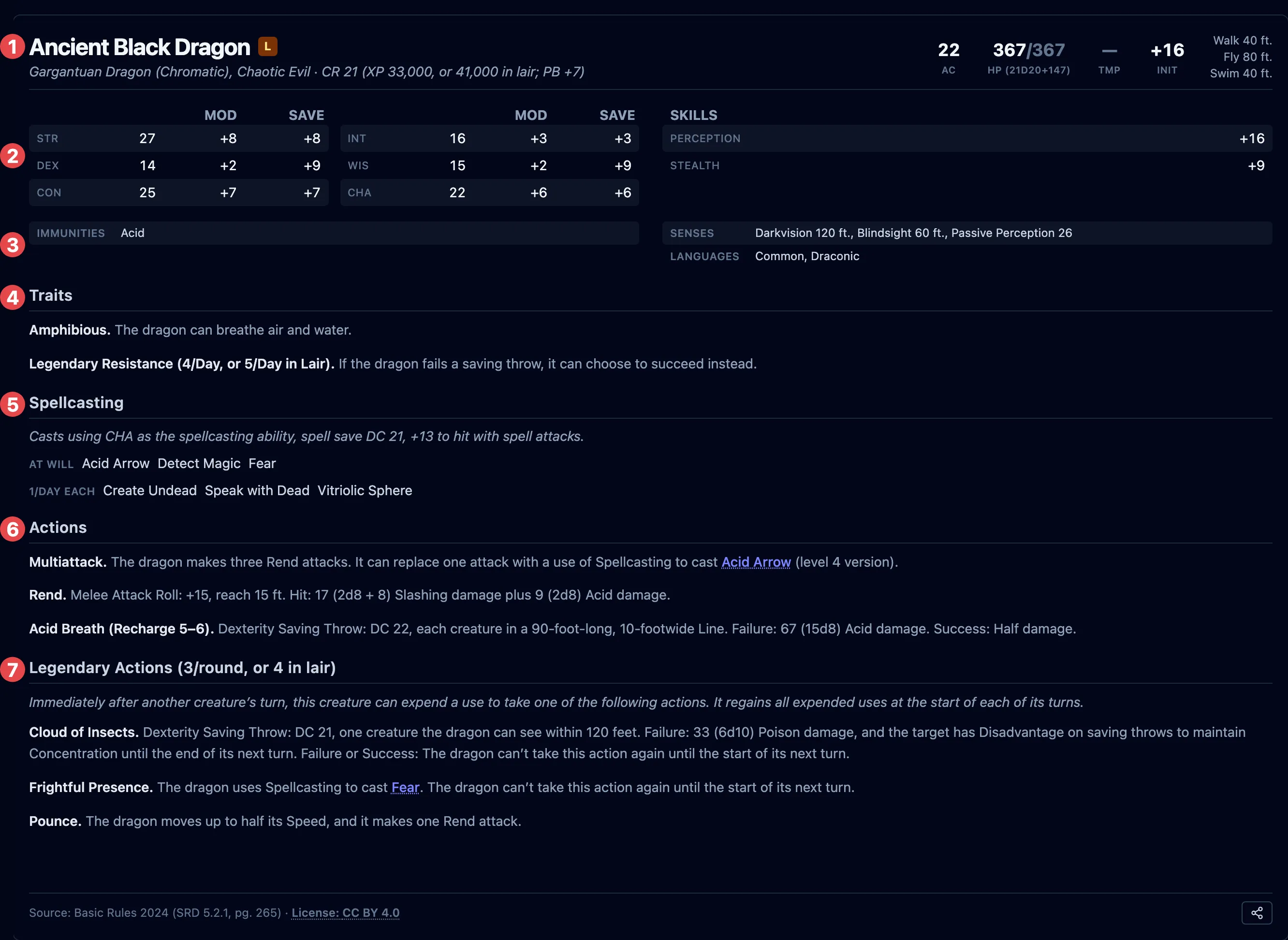
The header
Section titled “The header”The top of the block carries the creature’s identity and its headline numbers:
- Name, and below it the size, type, and alignment, then the challenge rating with its XP, for example Large Dragon, chaotic evil · CR 10 (5,900 XP).
- AC — armor class.
- HP — hit points; a creature also shows the hit-dice formula it rolled from.
- TMP — temporary hit points, counted separately and used up first.
- Init — the initiative modifier.
- Speed — walking speed and any others (fly, swim, burrow, climb).
A legendary creature is marked as such under the header.
Abilities, saves, and skills
Section titled “Abilities, saves, and skills”The six ability scores, each with its modifier and, where the creature is proficient, its saving throw bonus. Alongside them, any skills the creature is proficient in.
Defenses and senses
Section titled “Defenses and senses”Below the abilities:
- Resistances, immunities (including condition immunities), and vulnerabilities;
- Senses, including passive Perception and any darkvision or the like;
- Languages;
- Gear, when the creature carries any.
These defenses are what OpenFray applies when the creature takes damage. See Resolve an attack.
Traits, actions, and the rest
Section titled “Traits, actions, and the rest”The lower half lists what the creature can do, in the usual order:
- Legendary Resistance — during a fight, its own section with a uses-left counter.
- Traits — always-on features (Amphibious, Magic Resistance, Pack Tactics).
- Spellcasting — the creature’s spells, grouped by how often it can cast them.
- Actions, Bonus Actions, and Reactions.
- Legendary Actions and Lair Actions for creatures that have them.
- A Description with the creature’s flavor text, where the source has one. It starts open, so it’s there when the table asks. Click the heading to fold it away.
At the very bottom, a source line names the book the creature comes from, and its page where the book has one, for example Brood & Bloom, or Basic Rules 2024 (SRD 5.2.1, pg. 320). When the creature comes from one of OpenFray’s own books, that name is a link: click it to read the book in a new tab, so the fight stays on your screen. Every other source is plain text. Full credit for every book OpenFray uses is in CREDITS.md.
What you can click in a fight
Section titled “What you can click in a fight”During a fight, the parts that roll or spend something are clickable:
| Click this | And it does |
|---|---|
| An ability or skill | Rolls that check or save (a creature’s own). |
| An action with an attack or save | Opens the attack or save box. |
| A spell | Casts it. See Cast a spell. |
| A legendary action | Spends it from the round’s budget. See Spend creature resources. |
| A recharge ability | Spends it; OpenFray rolls to recharge on the creature’s turn. |
Everything else is there to read, including traits and the descriptive text of an action. OpenFray doesn’t roll a player’s dice on its own, so a player character’s abilities show the modifier only, and you enter what the player rolled.