
End the fight
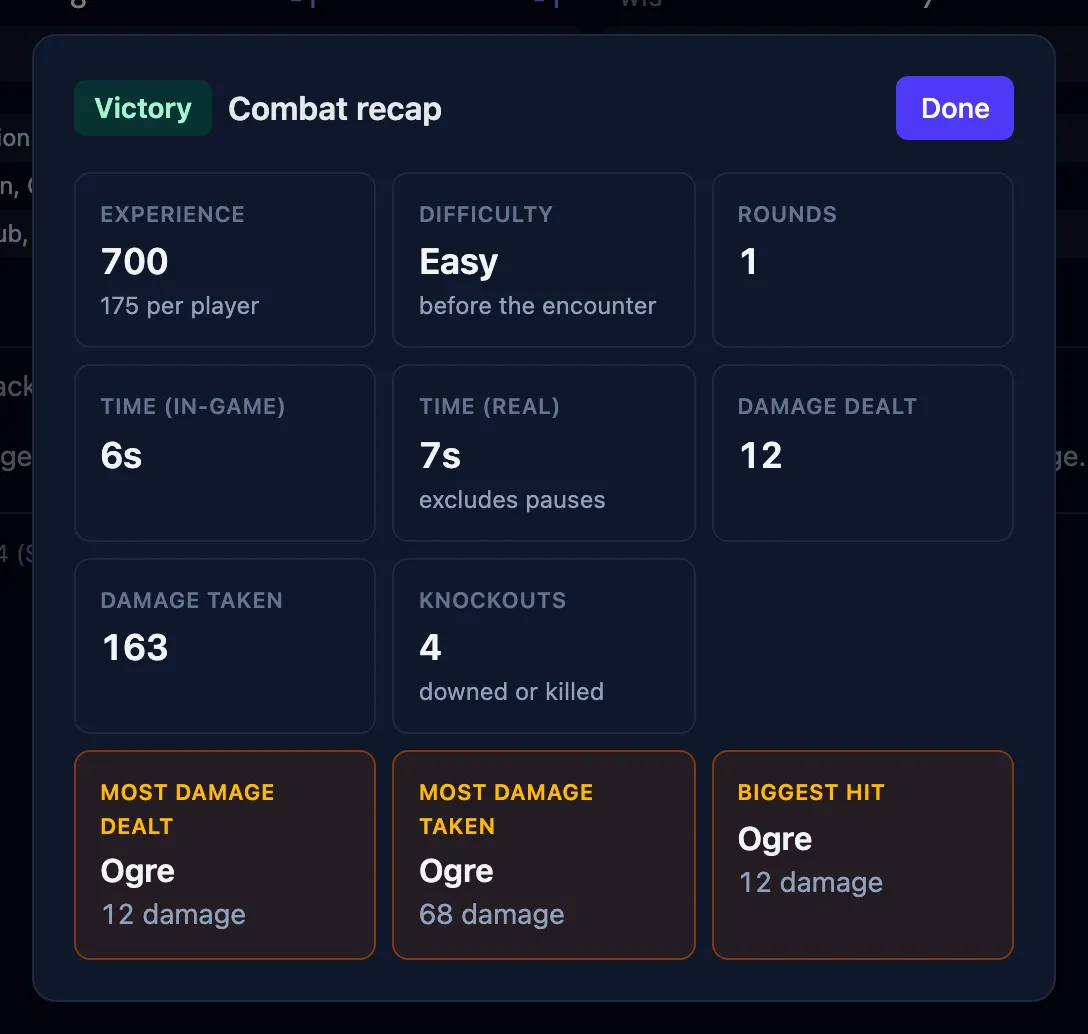
When a fight ends, OpenFray shows a summary of how it went: who won, the experience points earned, how long it took, and a few standout numbers. This page covers when the summary appears and what it shows.
When the summary appears
Section titled “When the summary appears”The summary comes up three ways:
- when you confirm the prompt after the last foe is defeated;
- when you press Stop to end the fight;
- when the whole party goes down.
A party wipe only counts once every player is dead or stable. One character still rolling death saves means the fight is still on.
What it shows
Section titled “What it shows”- The outcome — victory, defeat, or simply ended.
- The difficulty it was rated at before it began. See How hard the fight looks.
- Experience earned, and what that works out to per player. Only foes pay: a creature fighting for the party that went down isn’t an encounter the party overcame. When your campaign levels up by milestone, experience is left out.
- How long it took — rounds, in-game time at six seconds a round, and real time with pauses excluded.
- Total damage dealt and taken.
- Knockouts — how many combatants were downed or killed.
- Awards — most damage dealt, most damage taken, and the biggest single hit, each shown when the fight produced one.
Your players see it too
Section titled “Your players see it too”If you’re sharing a player view, the same summary appears on your players’ screens for as long as you leave it open, and their log clears at the same moment, ready for the next fight. Both are settings; see Settings & appearance.
Pressing Stop keeps everyone on the board, so you can read the summary and carry on. To take the board apart for the next fight, see Rest & clear the board.