The tracker

The tracker is the list of everyone in the fight, in initiative order. On a laptop it’s the left column; on a phone it’s the Tracker screen on the bottom bar. This page describes what a row shows and what you can do from it.
Before the fight starts, the tracker holds two groups, Players and allies and Creatures, so you can see both sides at a glance. When the fight begins, everyone merges into one list in initiative order.
Reading a row
Section titled “Reading a row”Every row holds the four things you check most often: initiative, name, hit points, and armor class.
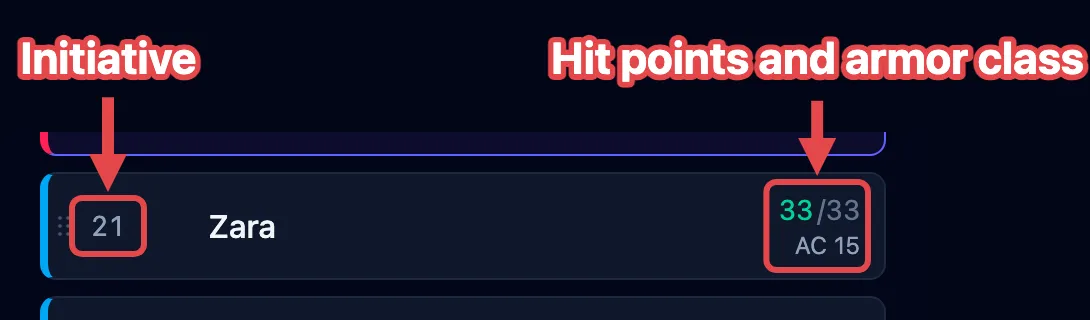
Around those four, a row can carry:
- Effect badges under the name, one per effect or bundle. See How effects work.
- A C badge while the combatant concentrates on a spell. See Track concentration.
- A Hidden tag when you’re keeping the combatant off the shared player view. Combatants simply waiting for the fight to start aren’t tagged; they reach your players on their own when you press Begin.
- An Unconscious or Stable tag, with the death-save pips, when a player character is down. See Handle death & dying.
- A remove (×) that takes the combatant off the board.
- A drag handle (six dots, far left) once the fight runs. See Rearranging the order.
During a fight, the creature whose turn it is glows, and its stat block fills the middle of the screen. Click any row to select that combatant and act on it.
Changing hit points
Section titled “Changing hit points”Click a combatant’s current hit points to change them. You can:
- type a number to set the total outright:
24; - type
+5to heal by that much; - type
-8to deal that much damage.
Current hit points change color as a creature gets hurt, so you can spot a badly wounded one at a glance. Temporary hit points are counted separately and consumed first when a combatant takes damage.
The video below shows each form typed into a row, and the tint following the damage:
Rearranging the order
Section titled “Rearranging the order”Once a fight is running, you can drag a row to a new spot in the initiative order, for a held action or to fix a number you typed wrong. The steps are in Run rounds & turns.